Choose a power station for a projector by checking its documented power connection, then budgeting the complete viewing session. The station must support the projector’s voltage, power and startup requirements, and provide enough usable energy for setup, the film, connected accessories and any required shutdown. A large AC wattage rating alone cannot tell you whether the battery will last through the credits.
If your projector has an internal battery, check whether it can cover the intended session before buying another battery. If it needs external power, compare the supported AC-adapter or USB-C PD arrangement. These five checks turn those requirements into a capacity decision you can verify before camping.
Wild Smart Gear has not tested the projector runtimes below. The energy examples use assumed loads and loss factors. Earlier versions of this draft described unsupported testing and vehicle-battery results; those claims have been removed.
1. Match the power station for a projector to its input
Identify the exact projector, generation, regional version and supplied power equipment. A model that uses a mains cable, one that takes an external DC adapter and one that supports USB-C PD need different connection checks. Keep the projector manual and station manual together when comparing them.
For the projector’s supported AC adapter, confirm the station supplies the permitted AC voltage and frequency. Check continuous output, any documented startup requirement and the combined load on shared outlets. Keep the specified adapter in the arrangement. Substituting a barrel-plug cable because it fits leaves voltage, polarity and current unresolved.
The Anker C1000 Gen 2 user guide, for example, lists separate AC, USB-C and car-output specifications. Its AC headline does not describe every other port. Use the intended output rating on the power station for a projector, including any shared allowance when other devices are attached.
USB-C needs a supported power arrangement
For a USB-C projector, compare its accepted PD profiles and required power with the station’s specific port and cable. “USB-C” identifies the connector; the available voltage and negotiated power still need checking. An output capable of powering a phone may not meet the projector’s requirements while it is displaying a film.
The current US soundcore Nebula Capsule 3 Laser product page describes a built-in 52Wh battery, manufacturer-claimed 2.5-hour movie playtime and support for PD charging. Its charging FAQ recommends a PD charger of at least 30W and a USB-C cable when troubleshooting a failure to charge. That recovery guidance does not establish that any 30W source sustains every brightness mode throughout a movie.
Check charging while operating separately from recharging while switched off. A projector can accept energy yet still draw down its internal battery during a demanding operating mode. Before choosing a power station for a projector, verify the exact mode and source you will use; the presence of a charging indicator does not prove a stable all-evening energy balance.
If your manuals do not resolve the arrangement, obtain clarification from the manufacturer or keep the supplied supported adapter. Buying additional capacity cannot resolve an unsupported connection.
2. Count the whole movie session in watt-hours
Write a timeline from initial setup to the end of permitted shutdown. Include menu navigation, focusing, trailers, pauses and any cooling process required by the projector manual. A two-hour film can keep equipment powered for longer than two hours.
Use electrical input energy for that timeline. ANSI lumens describe brightness, not watts of electricity. Likewise, a speaker’s advertised audio output is not necessarily its electrical input. Record device-specific consumption information or measure the supported complete arrangement with an appropriate energy meter.
| Session item | What to record |
|---|---|
| Projector | Selected brightness or image mode, electrical input and powered duration |
| Media source | Laptop, player or streaming device and its power path |
| Audio | Built-in sound or separate speaker; whether its battery is being charged |
| Lighting | Actual setting, count and hours |
| Shutdown | Required controls and any continued fan operation |
Measure over a representative session when possible. Note the initial projector battery level and whether it ends higher or lower. A trial that partly runs from the projector’s own battery can understate what the external source needs for another session unless that stored energy is accounted for.
For a power station for a projector, keep those boundaries consistent. Measuring the AC adapter’s input includes its conversion loss. Measuring at a different point calls for a different allowance. The AC and DC energy comparison explains why changing the power path changes the comparison.
A complete-session example
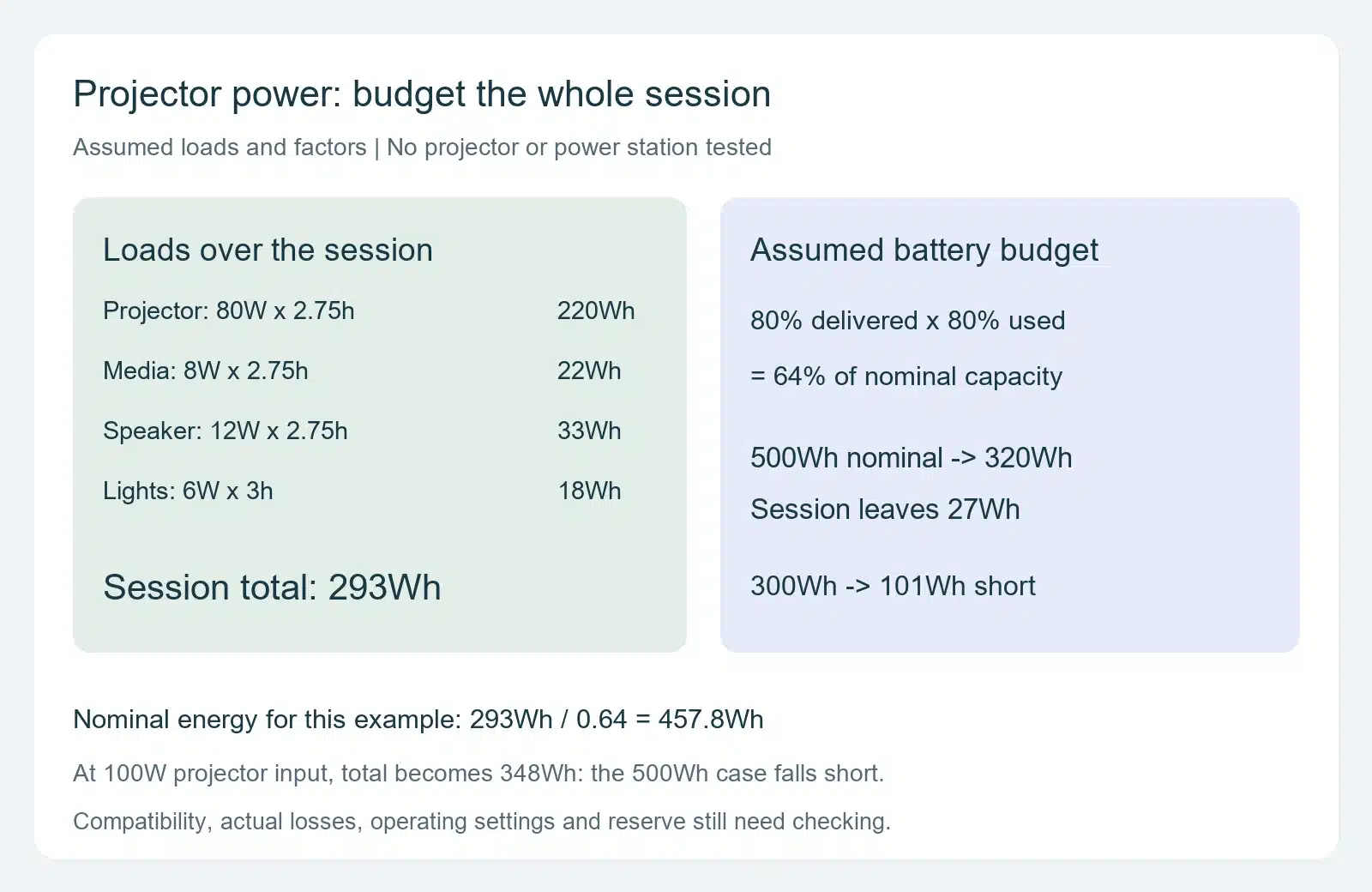
Assume the projector’s adapter averages 80W for 2.75 hours, including setup and the film. A separate media device averages 8W and a speaker supply averages 12W over the same period. Assume campsite lights use 6W for three hours. These are illustrative inputs, not typical ratings for every projector.
| Assumed load | Calculation | Energy |
|---|---|---|
| Projector and adapter | 80W × 2.75h | 220Wh |
| Media source | 8W × 2.75h | 22Wh |
| Speaker supply | 12W × 2.75h | 33Wh |
| Lights | 6W × 3h | 18Wh |
| Total at the connected loads | Sum of the four rows | 293Wh |
The simultaneous movie load is 100W before lighting, or 106W when those lights are also running. Its accumulated energy is 293Wh over the different durations. Both numbers matter when selecting a power station for a projector: output must support demand when connected, and usable battery energy must cover the schedule.
If a laptop is your media source, use its measured operating demand for that workload. Keep its own charging behavior with the observation rather than adding a maximum charger rating to an unrelated average. The laptop charging guide covers that separate connection task.
3. Compare the session with usable battery energy
Use measured delivered energy for your chosen power station for a projector and arrangement when you have a relevant observation. Otherwise, keep any conversion and reserve assumptions visible. Nominal battery watt-hours describe stored capacity; they are not a guarantee of the energy delivered to the projector’s adapter.
For this worksheet, assume 80% of nominal capacity becomes available at the connected loads, including station conversion and operating overhead. Keep 20% of that available energy unused as a planning reserve. The session budget is therefore nominal Wh × 0.80 × 0.80, or 64% of nominal capacity. These are assumed allowances for comparison, not measured efficiencies or manufacturer cutoffs.
Under those assumptions, the 293Wh example needs 293 ÷ 0.64 = 457.8Wh of nominal capacity. A nominal 500Wh power station for a projector has a 320Wh session budget and 27Wh left after the example loads. A nominal 300Wh station has 192Wh available under the convention and falls short by 101Wh.
The 27Wh margin is small relative to the uncertainties in an unmeasured setup. If the projector’s average input is actually 100W over the same 2.75 hours, the total becomes 348Wh. The nominal 500Wh example then falls short by 28Wh while retaining the assumed reserve. Record that sensitivity before treating a rounded battery size as sufficient.
Compare brightness and internal batteries before choosing a power station for a projector
Try the viewing mode you intend to use after dark. The Capsule 3 Laser charging FAQ recommends 50% brightness and Battery Mode to reduce quick battery discharge. It does not give a universal percentage saving for other projectors. Confirm acceptable picture quality and energy consumption together, rather than assuming every Eco setting produces the same reduction.
If the projector’s internal battery already covers your intended session, a separate power station for a projector may be unnecessary. Allow for the manufacturer’s stated conditions and verify a representative session with your content and settings. A 2.5-hour manufacturer claim leaves little scheduling margin for a film plus setup that takes 2.75 hours.
For two consecutive nights, budget two sessions or a dependable recharge between them. Two copies of the 293Wh example need 586Wh at the loads. Under the worksheet convention, that requires about 915.6Wh nominal without replenishment. Include other camping loads separately before assigning the same battery to them.
4. Check campsite conditions and output behavior
Give the power station for a projector a dry, stable placement within both manuals’ operating limits and ventilation requirements. Leave access to the controls and plugs, and route leads away from walking paths. Keep cables clear of equipment that can shift or pinch them.
A power station for a projector and the projector itself need separate weather checks. A station’s permitted environment does not establish that the projector, adapter or connections tolerate damp ground, rain or condensation. The rain-protection guide covers station placement; apply the projector’s own limits too.
Keep ventilation open during the permitted shutdown sequence. Follow the projector’s instructions before switching off the station output. Where a manual requires a cooling process, a nearly depleted battery is a poor time to begin it. The session timeline and reserve should leave room for that requirement.
Watch low-load pauses and shared ports
Check output controls, idle settings and shared-port limits on the power station for a projector. Menu screens, paused content or a fully charged accessory can change demand. An automatic low-load shutdown may interrupt a small projector or its media source even when battery capacity remains.
Use the low-load output checklist if an output stops after initially working. Keep reset or firmware steps with the exact manufacturer’s instructions. Avoid disabling protections as a substitute for finding why the intended arrangement is unsupported or unstable.
If you also use a power station for campsite lighting, retain independent light for packing up after the movie. The camping-lights energy worksheet helps budget brightness and hours without assuming that the station’s largest inverter rating determines lighting runtime.
5. Try the power station for a projector before departure
Try the power station for a projector over the complete session while another appropriate power source remains available. Use the selected image mode, cables, media source and accessories. Check startup, content playback, a normal pause and the permitted shutdown; record errors or unexpected output stops.
Keep the starting and ending charge state of both batteries if the projector has its own. Note cumulative energy where your equipment provides it, rather than relying on a single wattage reading. This observation can reveal whether the station supports the load, whether the projector is gradually drawing down its battery and whether your energy budget is realistic.
Plan the next session from the energy actually replaced. For example, a power station for a projector receiving an assumed 100W input for two hours gets 200Wh at its input. With an assumed 90% charging factor and 80% later delivery, that restores 144Wh for loads. It does not replace the full 293Wh example session. Actual input, charging state and duration need checking before you depend on the stop.
| Final purchase check | Evidence to keep |
|---|---|
| Power station for a projector connection | Exact models, regional ratings, approved adapter or supported PD arrangement |
| Complete viewing window | Setup, film, accessories and permitted shutdown |
| Energy budget | Measured demand or clearly assumed inputs, delivery allowance and reserve |
| Operating behavior | Startup, pause, shared outputs and end-of-session trial |
| Next night | Verified replenishment or enough starting energy when charging is unavailable |
Choose a smaller power station for a projector only when that record covers the intended session with an adequate margin for your uncertainty. If the trial falls short, reduce a documented load or duration, arrange dependable replenishment or select more compatible capacity. Return to the portable power station guide collection when the projector is part of a larger camping power plan.