A power station for a TV needs a compatible output for the complete viewing setup and enough usable energy for the time you want to watch. Estimate runtime from representative TV and accessory consumption, then subtract reserve and other loads from the available budget. Screen size and advertised output watts alone cannot tell you how many hours you’ll get.
Start with the television you own, its picture settings and the devices that deliver your program. These five checks turn that setup into a session budget. Numerical examples below use assumed inputs; they aren’t Wild Smart Gear measurements or promised product runtimes.
1. List everything needed to watch
Write down the TV’s exact model and supported supply, followed by the devices needed for your content. A built-in app, streaming stick, satellite receiver and games console create different arrangements. Add any soundbar, powered antenna amplifier and locally powered network equipment the session requires.
For a power station for a TV, count the setup that actually runs from that station. If the router has a separate battery, put it in a separate budget. If the same station powers both, count each once. Include downstream adapters in your measurement so their input consumption is represented.
| Viewing arrangement | Equipment to check |
|---|---|
| Built-in streaming app | TV plus the network equipment you power locally |
| Separate player | TV, player and supported supplies |
| Over-the-air broadcast | TV plus any powered tuner or antenna equipment |
| Console playback or gaming | TV, console and active accessories |
| External sound | Soundbar, receiver or powered speakers |
Electricity and content availability are separate checks. Powering a modem and router doesn’t guarantee that the internet provider remains online. A streaming app still needs its service and connection. For saved content, verify that the device actually plays it under the expected offline conditions before departure.
Use the network runtime worksheet for the router, modem or fiber terminal’s power budget. The outage network continuity guide covers the wider connection plan. Keep those tasks distinct from the television’s viewing energy.
An unpowered antenna needs no electrical allocation, but reception still needs checking at the intended location. A separately charged speaker may contribute no station load during playback while needing its own charge plan.
Choose a viewing arrangement before choosing capacity
If the TV offers a supported built-in app for your service, compare that arrangement with the separate player you otherwise use. ENERGY STAR notes that smart-TV streaming can avoid the additional energy of a console or digital media player. It does not establish a universal number of watts saved. The app still needs the content, network and functionality you require; a lower measured load is useful only when the program remains available.
For a television with its own internal battery, decide whether the station will charge that battery before viewing, supply the TV while it plays or do both. Read the TV’s instructions for simultaneous charging and operation. Record its starting and ending battery state alongside the station’s observations. A TV that finishes the film with a depleted internal battery may have drawn on both sources, so the station reading alone doesn’t describe a repeatable all-station session.
A precharged TV and a separately charged speaker can be a sensible arrangement when their supported battery runtimes cover your session. Their charge energy still belongs somewhere in the trip plan. Do not count an internal battery’s full nominal Wh as extra energy delivered to the screen without evidence for its own power path and conditions.
The power station for a TV you select should support that particular arrangement. Two screens with the same diagonal size can have different supplies, presets and average consumption. A borrowed consumption table cannot replace the label and a representative observation for the exact model.
2. Measure the picture mode you will use
Read the label and manual for supply voltage, frequency and input requirements. A listed maximum or adapter output rating is useful for compatibility; it doesn’t necessarily describe average consumption while watching. One moment of demand on the station display won’t represent an entire movie either.
Where the documented connection permits it, use an energy meter rated for the actual voltage, current and equipment. Record cumulative Wh across a representative program with your normal brightness, picture mode, sound level and accessories. For a kWh reading, multiply the change by 1000 to obtain Wh.
Room lighting belongs in the record. ENERGY STAR’s television guidance explains that automatic brightness control adjusts the picture relative to room brightness and identifies energy-saving picture presets. A dim-room measurement with one preset may not describe daytime viewing.
When assessing a power station for a TV, keep the content and settings you intend to use. Compare another preset only if it remains comfortable to watch. Measure its complete session instead of assuming a brightness slider’s percentage produces an equal reduction in electricity use.
Include startup, menus and pauses
Start the record before powering the setup on and finish after normal shutdown. Include sign-in, menus, pauses and any period you plan to leave equipment powered after viewing. These belong to the session even when the screen displays little activity.
For a simplified estimate, average watts equal session Wh divided by hours. If a hypothetical setup uses 270Wh during three hours of representative viewing, its average demand is 90W. That doesn’t establish its highest momentary demand or the energy of another program and mode.
A meter between the AC outlet and all viewing supplies measures their AC-side energy, including downstream adapters. It excludes the station’s internal conversion and overhead. Keep that measurement point with the result; don’t mix readings from different points without identifying the conversion stages.
Compare viewing modes on the power station for a TV
Use the same content, duration, accessories and room-light conditions when comparing presets. Record any automatic-brightness setting. If you change the soundbar, media source and room lighting at the same time, the energy difference cannot be assigned to the picture mode alone.
For illustration, one assumed two-hour session uses 180Wh and another uses 150Wh. Their average demands are 90W and 75W respectively. The difference is 30Wh for those sessions. It doesn’t establish the difference at another brightness, program or duration, and it isn’t a measurement from this site. That comparison becomes useful when your own readings show both arrangements deliver an acceptable picture and the required content.
Keep the highest observed running demand with those averages. If the source trips at startup while the average session energy would fit, investigate startup and connection compatibility. Increasing the estimated hours or changing the reserve cannot solve a supply that fails before viewing begins.
| Measurement record | Conditions that make it reusable |
|---|---|
| Equipment | Exact TV, accessory and station models; connections |
| Picture and audio | Preset, brightness control, content and sound setup |
| Environment | Room brightness and permitted temperature |
| Duration | Startup, program, pause and shutdown |
| Energy | Start/end cumulative reading and meter location |
| Behavior | Resets, warnings and unexpected stops |
3. Calculate the complete viewing budget
For a power station for a TV, use energy available to the viewing loads after reserve and other allocations. With representative average demand, the simplified runtime is:
Viewing hours = available viewing Wh ÷ average setup W
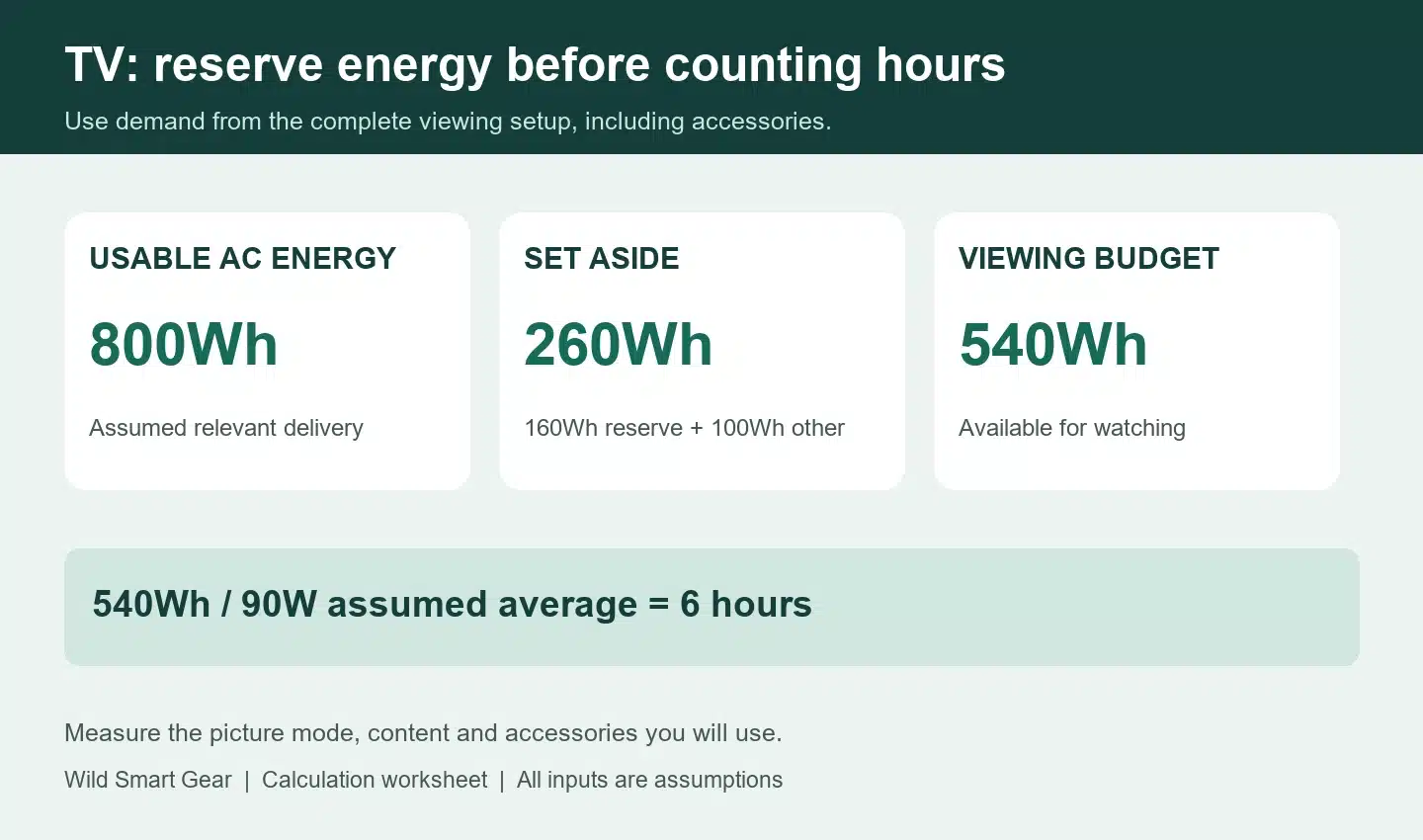
Suppose 800Wh of usable AC energy is available under relevant conditions. Set aside 160Wh as reserve and 100Wh for other AC loads. That leaves 540Wh for viewing. At a hypothetical 90W average setup demand, the arithmetic gives six hours.
This example starts with usable AC energy, so it doesn’t apply another inverter-efficiency percentage. If you start with nominal battery Wh, state the fraction assumed to reach the AC loads, then hold reserve separately. No generic 80% or 85% value establishes your station’s actual delivery.
Accessories change the hours
The following table uses the same 540Wh viewing allocation. Every wattage is an assumed input, not a typical figure assigned to a screen size or product.
| Assumed setup | Average demand | Calculated viewing time |
|---|---|---|
| TV alone | 70W | About 7.7 hours |
| TV plus player | 80W | 6.75 hours |
| TV, player and soundbar | 100W | 5.4 hours |
| TV and a higher-demand companion device | 200W | 2.7 hours |
The 200W row shows why a TV-only estimate can fail when you add another device. It doesn’t describe every console or receiver. Measure your equipment, including charging or downloads if they occur during the session.
Count more than the film
Consider a different hypothetical routine: 15 minutes of setup at 50W, two hours of viewing at 100W and a 15-minute pause at 20W. Its AC-side energy is:
50 × 0.25 + 100 × 2 + 20 × 0.25 = 217.5Wh
Two identical sessions need 435Wh. Against the 540Wh allocation, that leaves 105Wh of slack outside the reserve. A third session exceeds the allocation. This phase example uses a different setup from the earlier 90W example; don’t combine them as one measurement.
If choosing nominal capacity from scratch, an assumed 80% available-energy fraction and reserve of 20% of that available energy would make a 217.5Wh session require about 340Wh nominal: 217.5 ÷ (0.80 × 0.80). These assumptions explain the calculation, not a universal recommended battery size.
Use the general runtime formula to rearrange your own inputs. Keep the usable-energy basis consistent with the connection, demand and duration.
Check the weaker capacity case
An exact arithmetic fit can be sensitive to the available-energy assumption. Consider an assumed 500Wh nominal station, a 20% reserve of usable energy and a complete setup averaging 90W. At an assumed 80% available fraction, planned viewing energy is 320Wh and the estimate is about 3.6 hours. At a 70% fraction it becomes 280Wh and about 3.1 hours. These fractions aren’t measured efficiencies; the comparison shows how much uncertainty your plan can tolerate.
If you need four hours, neither case meets the target. Reducing your reserve simply changes what you leave unused; it doesn’t improve the station’s delivery. A supported lower-demand viewing arrangement, additional compatible capacity or a shorter session changes the requirement more directly. Select the change from the shortfall you actually observe.
For a power station for a TV, count setup and other allocated loads before judging a candidate that seems to cover the film exactly. Round a shopping requirement upward sensibly and verify the actual equipment. A calculation near a product’s nameplate value leaves little allowance for inputs that turn out to be optimistic.
4. Check output and idle settings on a power station for a TV
Read both devices’ requirements before using a power station for a TV. Confirm normal AC voltage and frequency, continuous output, per-outlet current and shared limits. Include the start and operation of other simultaneously powered devices. Large nominal capacity doesn’t compensate for an incompatible output.
Use the supplied or manufacturer-supported TV power arrangement. If it supports external DC, check exact voltage, polarity, current, connector and permitted adapter. A barrel plug fitting doesn’t establish compatibility. A television’s USB port may serve accessories or data; its presence doesn’t establish a supported USB power input for the TV.
Our AC and DC compatibility guide explains how to compare the full path. A DC route can contain conversion electronics, and its energy advantage needs evidence. Keep compatibility ahead of a presumed saving.
Check the TV’s sleep settings and the station’s documented output timers separately. A paused or sleeping setup drawing little energy might fall within an automatic output-shutdown condition. The threshold, delay and applicable outputs are model-specific; don’t borrow them from another manual.
If a power station for a TV stops supplying the setup after initially working, record which output stopped, elapsed time and warnings. Use the low-load output checklist when the observation points to a timer. Adding an unnecessary appliance to keep an output awake spends energy and leaves the setting question unresolved.
Keeping the output enabled may consume energy while the TV is off. Include that interval if your usable-energy observation doesn’t cover it. Follow the television’s after-use instructions before removing power; its normal shutdown may include maintenance behavior.
5. Verify a complete viewing session
Try a power station for a TV with final equipment, settings, content and shared loads while another appropriate source is available. Preserve documented location, temperature and ventilation requirements. Indoor television equipment shouldn’t be assumed suitable for damp outdoor use because its source is portable.
Run through startup, menus, a normal program, a pause and required shutdown. Confirm both that equipment remains powered and that content stays available. Record starting and ending energy readings, battery state and interruptions.
| What happens | What to investigate |
|---|---|
| Screen and accessories lose power | Output state, warnings and supported connection |
| Screen stays on but streaming stops | Player, network or service availability |
| Picture stops after a repeatable pause | TV sleep settings and applicable station timer |
| Session completes with too little reserve | Demand, usable energy and other loads |
| Restarting an accessory interrupts viewing | Shared output, connection and device behavior |
If automatic backup during mains failure matters, verify the exact supported transfer arrangement separately. A standalone viewing test establishes neither uninterrupted transfer nor automatic restart. Check both manuals rather than relying on a UPS or EPS label.
For multiple evenings, budget each session until the next dependable recharge. Count energy replenished through a supported charging arrangement, not a panel’s printed watts or charger’s peak input. A short charging period may restore only part of the previous session’s use.
Put recharge before the next viewing window
Two copies of the hypothetical 217.5Wh session need 435Wh at the AC loads. If only 300Wh has been assigned to viewing, the second evening needs at least another 135Wh delivered to those loads, or a changed routine. Energy reserved for another task remains unavailable to this calculation unless you deliberately revise the shared plan.
Suppose a supported charging source supplies an assumed average 100W for two hours: 200Wh enters the station. Under separate assumed 90% charging and 80% later delivery factors, that restores 144Wh for AC loads. It would cover the 135Wh shortfall with only 9Wh of slack in this example. It does not establish that a real two-hour charging stop will do so; battery state, source availability and accepted input need checking.
Record whether that refill happened before the second evening. If charging is missed, use the budget still available: choose a shorter verified session, a supported lower-demand setup or another prepared viewing arrangement. Keeping the original six-hour estimate after spending energy elsewhere would hide the shortfall rather than resolve it.
When a power station for a TV also powers household equipment, put viewing into the shared home-backup load plan. That keeps the TV from spending energy assigned to another job. Retain exact models, a complete-session record, usable-energy basis and reserve so you can repeat the check when settings or accessories change.